
Introduction
Running a small business today is very different from how it was a decade ago. Customers search online before they buy, compare services digitally, and expect fast communication. This is why Web solutions for small businesses have become a basic need rather than a luxury. Even a simple website or online tool can help a small business look professional, attract new customers, and compete with bigger brands.
Many beginners feel confused when they hear terms like website development, hosting, cloud tools, or digital security. The good news is that modern web solutions are easier, more affordable, and more flexible than ever before. You do not need advanced technical skills or a big budget to get started. With the right guidance, even a small team or solo entrepreneur can build a strong online presence.
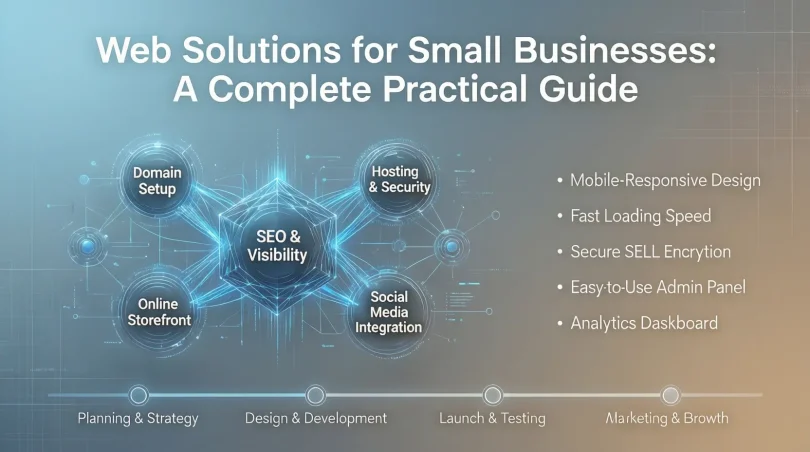
Web solutions for small businesses cover more than just websites. They include online stores, booking systems, customer support tools, payment gateways, and digital marketing platforms. When used correctly, these solutions save time, reduce manual work, and improve customer experience.
In this guide, you will learn what web solutions for small businesses really mean, why they matter, and how to choose the right ones step by step. The content is written in simple English with practical examples, so both beginners and intermediate readers can understand and apply it easily. By the end, you will have a clear roadmap to build a smart, secure, and scalable online foundation for your business.
What is Web Solutions for Small Businesses?
Web solutions for small businesses refer to digital tools and services that help businesses operate, promote, and grow online. These solutions are designed to support daily operations, improve visibility, and connect with customers through the internet.
At the core, a web solution usually starts with a website. This website can be informational, service-based, or an online store. However, modern web solutions go far beyond a basic website. They include web applications, cloud-based software, online forms, customer relationship tools, and automation systems.
For example, a small bakery may use a website to display products, an online order form for customers, and a payment gateway to accept digital payments. A local service provider may use a booking system, email notifications, and a contact form to manage appointments efficiently.
Web solutions for small businesses are usually scalable. This means you can start small and add features as your business grows. Most solutions are also customizable, allowing you to match your brand style and business needs.
In simple words, web solutions help small businesses work smarter, not harder. They bring your business online, improve efficiency, and create better experiences for customers without requiring complex technical knowledge.
Why is Web Solutions for Small Businesses Important?

Web solutions for small businesses play a key role in long-term success. In today’s digital-first world, customers expect businesses to be online, responsive, and reliable. Without proper web solutions, small businesses often lose opportunities to competitors who are more digitally active.
One major reason is visibility. When your business has an online presence, people can find you through search engines at any time. This increases trust and credibility. A business without a website may appear outdated or unreliable to modern customers.
Another important factor is efficiency. Web solutions automate tasks like order processing, customer inquiries, and data storage. This reduces manual work and saves valuable time. Small teams can handle more customers without feeling overwhelmed.
Cost effectiveness is also a big advantage. Many web-based tools are affordable and offer flexible pricing. Compared to traditional advertising or manual systems, digital solutions often provide better results at a lower cost.
Finally, web solutions help businesses understand customers better. Analytics tools show how users interact with your website, what products they like, and where improvements are needed. This data-driven approach helps small businesses make smarter decisions and grow steadily in a competitive market.
Detailed Step-by-Step Guide
Step 1: Identify Your Business Goals
Before choosing any web solution, you must clearly define your business goals. Ask yourself what you want to achieve online. Your goals will guide every decision you make.
Common goals include:
- Increasing brand awareness
- Selling products online
- Generating leads
- Improving customer support
- Automating internal processes
For example, if your goal is online sales, you will need an eCommerce platform. If your goal is lead generation, a simple website with contact forms may be enough. Clear goals prevent unnecessary spending and confusion.
Step 2: Choose the Right Type of Website
The next step is selecting the type of website that fits your business model. Different businesses need different website structures.
Common website types include:
- Informational websites
- Business service websites
- eCommerce stores
- Portfolio websites
- Booking and appointment websites
A small consulting firm may need a professional service website, while a retailer will benefit from an online store. Choosing the right type ensures better user experience and higher conversion rates.
Step 3: Select a Reliable Hosting and Domain
Hosting and domain selection is a critical technical step. Your domain name should be simple, memorable, and related to your business name. Hosting should be reliable, secure, and fast.
Look for hosting providers that offer:
- Good uptime
- Fast loading speed
- Customer support
- Security features
- Scalability options
A slow or unreliable website can drive customers away and harm your online reputation.
Step 4: Design for User Experience
Design plays a major role in how visitors interact with your website. A clean, simple, and responsive design improves trust and usability.
Focus on:
- Mobile-friendly layout
- Easy navigation
- Clear call-to-action buttons
- Readable fonts
- Consistent branding
For example, an online store should make it easy to find products, view details, and complete purchases without confusion.
Step 5: Integrate Essential Web Tools
Once your website is ready, integrate essential web tools to improve functionality. These tools turn a simple website into a powerful business platform.
Important tools include:
- Contact forms
- Live chat support
- Email marketing tools
- Payment gateways
- Analytics tools
These integrations help you communicate with customers, track performance, and manage operations more efficiently.
Step 6: Focus on Security and Data Protection
Security is often ignored by small businesses, but it is extremely important. Web solutions for small businesses must protect customer data and business information.
Basic security steps include:
- SSL certificates
- Regular backups
- Strong passwords
- Updated software
- Secure payment systems
A secure website builds trust and prevents costly data breaches.
Step 7: Test, Launch, and Improve
Before launching, test your website thoroughly. Check forms, links, loading speed, and mobile compatibility. Fix errors and make improvements based on feedback.
After launch, continue improving your web solution. Monitor performance, update content, and add new features as needed. Web solutions are not one-time projects but ongoing investments.
Benefits of Web Solutions for Small Businesses
- Improved online visibility and brand presence
- Better customer engagement and communication
- Increased sales and lead generation
- Cost-effective marketing and operations
- Time-saving automation of routine tasks
- Access to valuable customer data and insights
- Scalability to support business growth
- Enhanced professional image and credibility
Disadvantages / Risks
- Initial setup time and learning curve
- Ongoing maintenance requirements
- Security risks if not managed properly
- Dependence on internet connectivity
- Potential costs for premium tools and features
- Poor results if solutions are chosen without planning
Common Mistakes to Avoid
Many small businesses make avoidable mistakes when adopting web solutions. One common mistake is rushing into development without clear goals. This often leads to wasted money and unused features.
Another mistake is choosing the cheapest option without considering quality. Poor hosting, weak security, or bad design can harm your business image. Ignoring mobile users is also a major issue, as most customers browse on smartphones.
Some businesses also fail to update content regularly. Outdated information reduces trust. Lastly, ignoring analytics means missing valuable insights that could improve performance and growth.
FAQs
What are the best web solutions for small businesses?
The best solutions depend on your goals. Common options include business websites, eCommerce platforms, email marketing tools, and customer management systems.
Do small businesses really need a website?
Yes, a website builds trust, improves visibility, and allows customers to find information easily. It is often the first impression of your business.
Are web solutions expensive for small businesses?
Many web solutions are affordable and offer flexible pricing. You can start small and upgrade as your business grows.
How long does it take to set up web solutions?
Basic websites can be set up in days, while advanced solutions may take weeks. Planning and clear goals reduce setup time.
Can web solutions help local businesses?
Yes, local businesses benefit greatly from online visibility, booking tools, and customer communication features.
How do web solutions improve customer experience?
They provide easy access to information, fast communication, online services, and smooth purchasing or booking processes.
Expert Tips & Bonus Points
Always start with simple and essential features. Avoid overloading your website with unnecessary tools. Focus on user experience and clear messaging. Regularly review performance data and make improvements. Invest in security from the beginning. Choose scalable solutions that grow with your business. Most importantly, think from the customer’s perspective when designing and updating your web presence.
Conclusion
Web solutions for small businesses are no longer optional in today’s digital environment. They provide the foundation needed to reach customers, streamline operations, and build long-term growth. Even the smallest business can benefit from a strong online presence when the right tools are chosen wisely.
By understanding your goals, selecting the right website type, and integrating essential tools, you can create a web solution that supports your daily work and future expansion. The process does not require advanced technical skills, but it does require planning, consistency, and a focus on quality.
Web solutions for small businesses also help create trust. A secure, well-designed, and informative website shows customers that your business is professional and reliable. Over time, this trust turns into loyalty, referrals, and steady growth.
The digital world continues to evolve, but the basics remain the same. Clear goals, simple design, security, and continuous improvement are the keys to success. When implemented correctly, web solutions become powerful assets that help small businesses compete, adapt, and thrive in a competitive market.